VCStopwatch — voice-controlled stopwatch and timer
Start, pause, mark laps, switch phases, and ask for the current time by voice — without touching the screen.
Built for workouts, cooking, Pomodoro, study, deep work, breathing exercises, music practice, and everyday routines where your hands are busy and the timer still needs to listen.
— Voice control for the stopwatch, timer, and session profiles
— Voice announcements for time, start, pause, and other events
— Wake word support to reduce accidental triggers

Voice-controlled stopwatch and timer for busy hands
Say a command and keep moving.
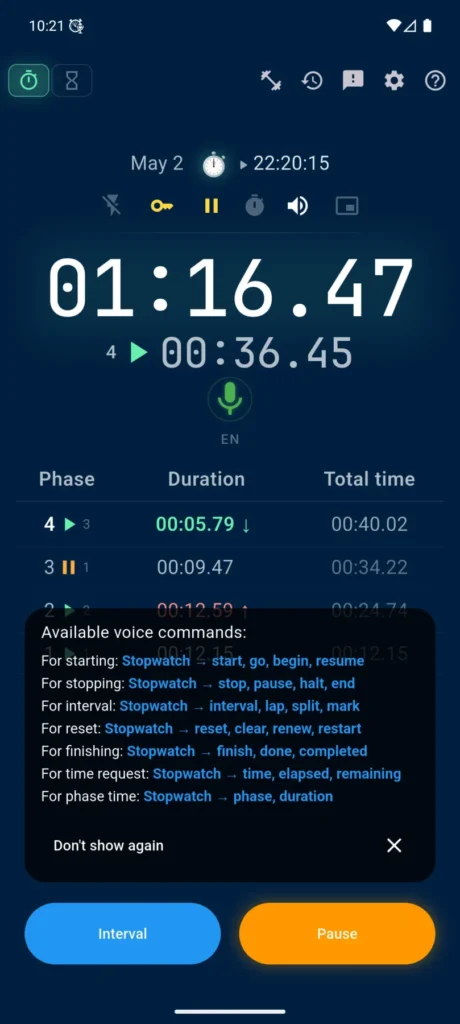
VCStopwatch is a voice-controlled stopwatch and timer that does more than announce time. You can start the stopwatch, pause the timer, mark a lap, ask for the current time, or move to the next phase of a structured session without touching the screen.
Each action can have several command phrases, so you do not have to remember one exact sentence.
When the environment is noisy, enable the wake word. Say “stopwatch” or “timer” before the command to reduce accidental triggers from conversations, videos, or background sounds.
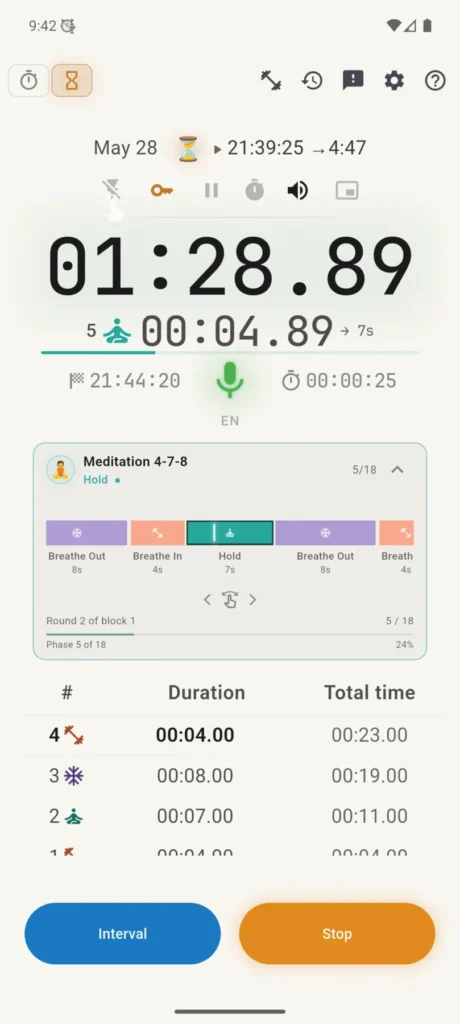
The Quick Settings panel above the dial shows important states and gives fast access to key features: background mode, wake word, pause accounting, countdown delay, sound, and the floating dial.
The microphone below the dial is a separate control. It shows whether voice control is active, temporarily muted, or turned off.
Session profiles with phases and laps
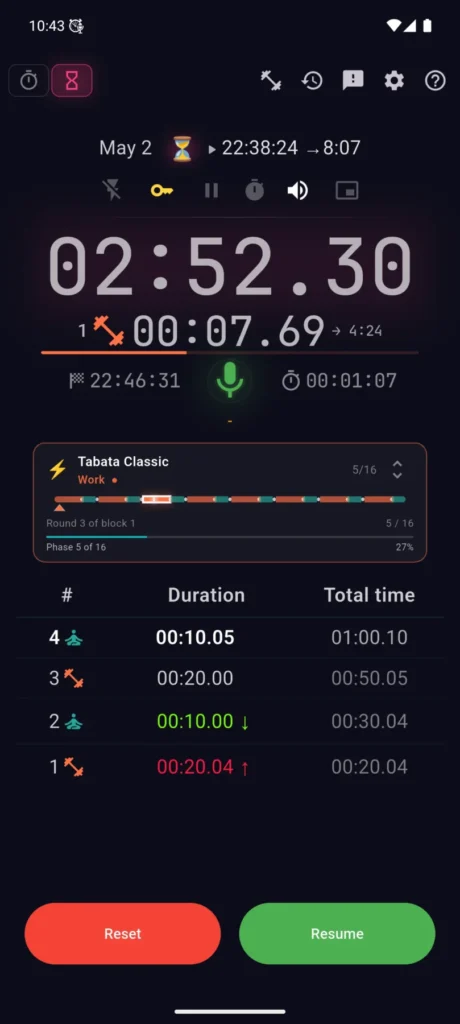
VCStopwatch can work as more than a simple stopwatch or countdown timer. You can run session profiles with phases, blocks, repeats, and laps.
A colored timeline shows the session structure and the current phase. This is useful for Tabata, HIIT, interval walking, breathing routines, Pomodoro, music practice, and other scenarios where you need to follow a planned sequence, not just measure time.
Ready-made templates for a faster start
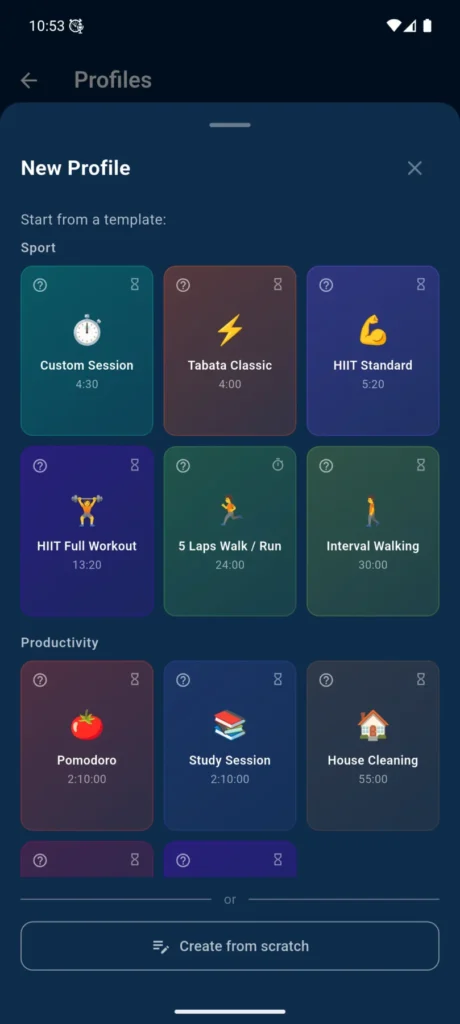
Start with a ready-made template and adjust it to your routine.
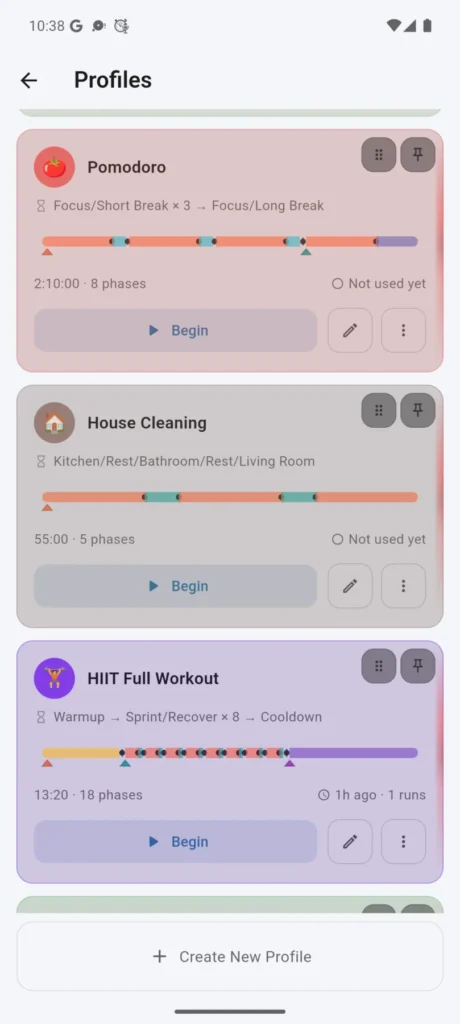
VCStopwatch includes templates for Tabata, HIIT, interval walking, Pomodoro, study sessions, deep work, breathing and meditation, cooking, cleaning, and music practice.
A template is not a strict program. It is a starting point. You can change phase durations, repeat counts, block structure, and use the profile for your own scenario.
Build your own session
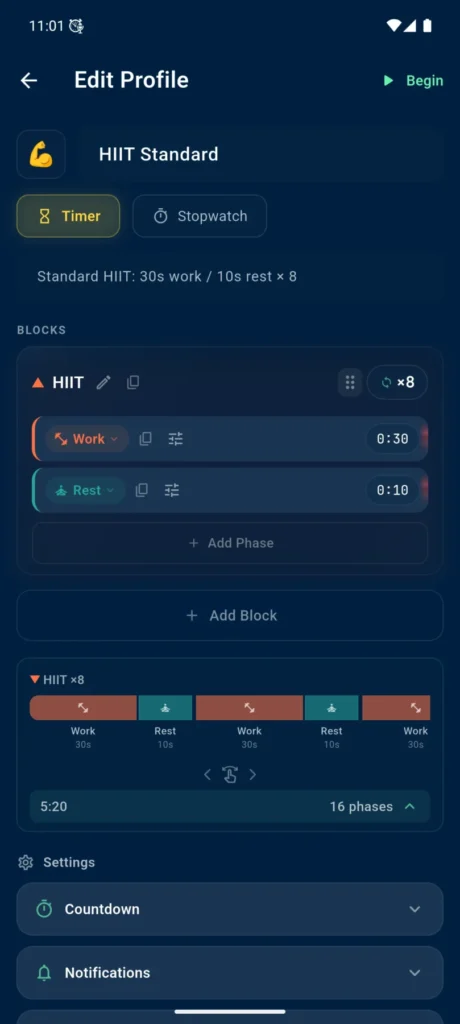
The profile editor lets you create your own sessions from blocks and phases.
For example, in a HIIT profile, you can configure a work phase, rest, repeat count, and execution order. The expanded timeline helps you see the session structure in more detail: phase names, durations, and repeated parts.
You can build not only a workout, but also a study cycle, breathing routine, kitchen timer, music practice flow, or any other repeated process.
Floating dial and dimmed screen
VCStopwatch can show the timer over other apps as a separate floating dial.
It stays visible while you use a recipe, workout video, browser, chat, game, or notes.
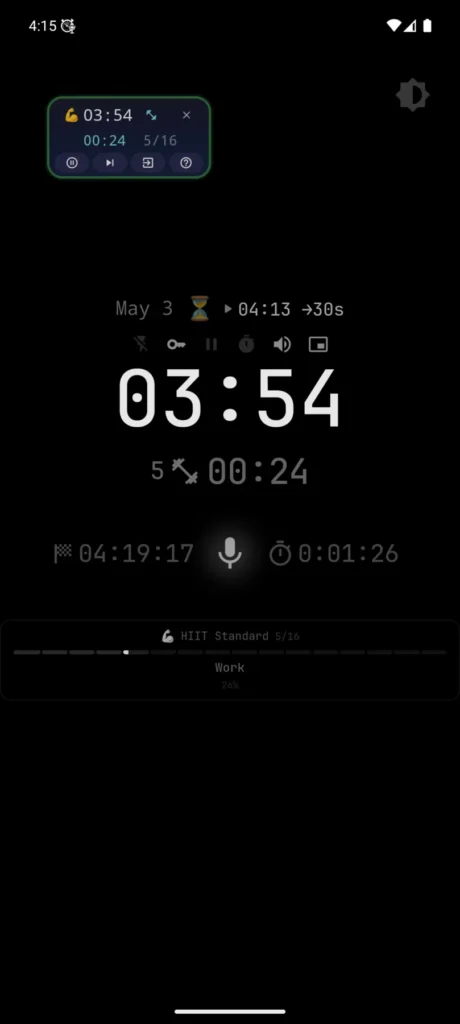
The floating dial can be compact, expanded, or expanded with buttons. This lets you monitor time and perform quick actions without constantly returning to the app.
Dimmed screen for calm time tracking
When you do not need the full interface, you can use the dimmed screen: the background becomes dark and simplified, while the dial remains easy to read.
This mode is less distracting and works well for workouts, waiting, breathing routines, and other situations where you simply want to keep an eye on time. On OLED/AMOLED screens, the darker background may also use less battery than a bright light screen.
A result after every session
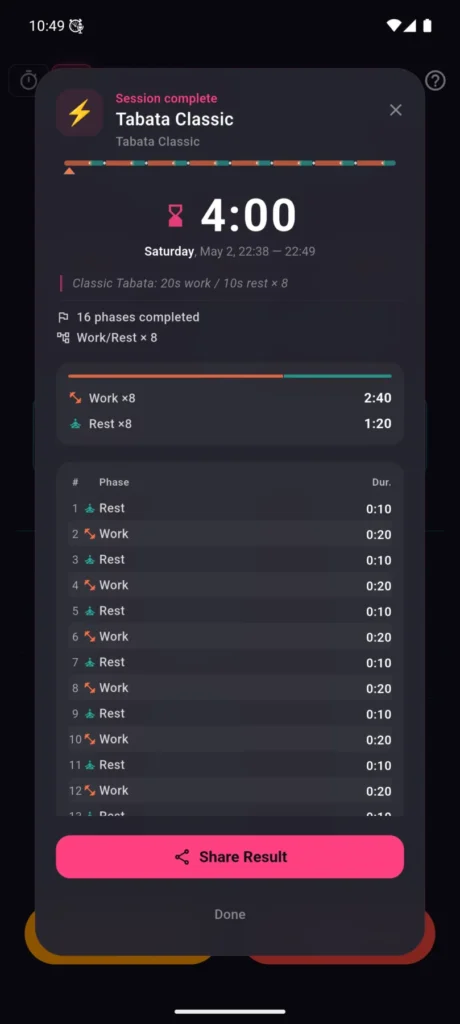
After a session ends, VCStopwatch shows a clean completion card.
You can see that the session is finished, how long it took, what data was saved, and what you can do next. Save the result, share it, or use it as a quick summary of your workout, practice, or task.
Session history with details
VCStopwatch history is more than a list of launches.
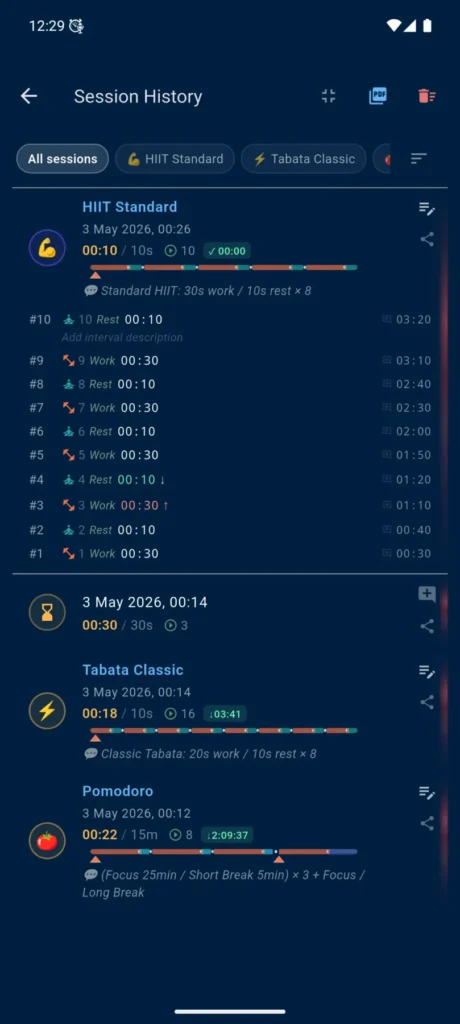
You can see different session types: a basic stopwatch, a countdown timer, and profile-based sessions. For profile sessions, phases, laps, and colored timelines are saved. You can expand the latest or selected session to view more details.
This is useful when you want to return to a past workout, compare results, or simply keep a record of completed work.
Names, descriptions, and phase notes
You can set or edit a session name and description. For individual phases, you can add text notes manually or use prepared description templates.
This turns history into more than a time log — it becomes a personal journal for workouts, practice sessions, study cycles, and focused work.
PDF reports and results worth keeping
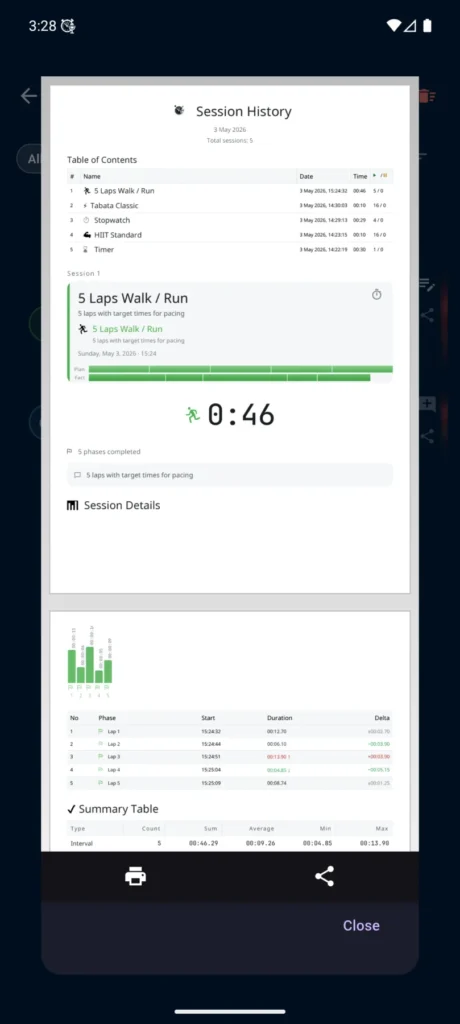
VCStopwatch can create PDF reports from your session history.
A report can include different activity types: a basic stopwatch, a countdown timer, and profile-based sessions. For complex sessions, you can see timelines, plan-vs-actual comparison, phase charts, detail tables, and summary data.
Save it, share it, print it, or use it to track your progress.
If you add descriptions to sessions or phases, the report keeps more than time. It also preserves the context: what you did, how the session was structured, and which parts mattered most.
Choose your timer style
VCStopwatch supports several visual themes: a classic blue theme, two dark themes, and two light themes.
Choose the style that fits your workout, desk work, kitchen, evening use, or calm practice. Light themes work especially well with colorful profile cards and make the interface feel cleaner for daytime use.
Offline speech recognition
VCStopwatch recognizes voice commands directly on your phone. After the selected language model is downloaded for the first time, voice control can work without a constant internet connection.
This is useful at the gym, outdoors, in the kitchen, while traveling, or anywhere the connection is unstable. You can start the stopwatch, pause the timer, mark laps, and move between phases by voice — even without reliable internet.
Internet access is needed for the first language model download and normal Google Play functions. Command recognition itself runs on the device.
16 languages
VCStopwatch supports interface and speech recognition in 16 languages: English, Russian, Ukrainian, Spanish, German, French, Portuguese, Italian, Polish, Turkish, Dutch, Hindi, Chinese, Japanese, Korean, and Vietnamese.
Why I created VCStopwatch
VCStopwatch did not start as a marketing idea. It started with a simple family situation: I wanted to help my daughter practise hula hoop at home, see her progress, and avoid walking over to the phone after every attempt.
Questions before installing
Is my voice sent to a server?
No. Voice commands are recognized locally on your phone. Microphone audio is not recorded, stored, or sent to a server. Internet access is needed only for the first language model download and updates.
Do I need internet for voice commands?
Only for the first download of the selected language. After the language model is downloaded, command recognition works offline. This is useful for workouts at home, in the gym, or anywhere the internet connection is unstable.
Does voice control work with the screen off or in the background?
Yes, if you enable Background Mode — the ⚡ icon on the main screen. It is off by default so the app does not keep the microphone active unnecessarily and saves battery. If you need voice commands with the screen off or while using other apps, you can turn Background Mode on manually.
Why can the app stop working when the screen is off?
On some phones, Android limits background apps to save battery. The app includes a button that helps allow background operation for VCStopwatch. On Samsung, Xiaomi, and some other devices, you may still need to adjust battery settings manually.
Do I have to say “Stopwatch” or “Timer” before each command?
By default, yes. This wake word helps prevent accidental triggers near TV, music, or conversation. If you want shorter commands — “start”, “stop”, “lap”, “reset” — you can disable the wake word in settings, but accidental triggers may become more likely.
Can I control time on top of other apps?
Yes. The floating dial can appear over other apps, such as a browser, notes, or video, and lets you see the time without constantly returning to VCStopwatch. Android will ask for the “Display over other apps” permission.
Get VCStopwatch
Download VCStopwatch from Google Play and start a hands-free timer with your voice.